Free QR Code & Barcode Generator Online
The fastest QR barcode maker on the web. Generate QR codes and barcodes instantly — no sign-up, no watermark, and totally free.
Trusted by marketers, retailers, restaurants, and event organizers worldwide. Read our guides →
Why Choose Our Free Barcode Generator
Everything you need to create professional QR codes and barcodes online.
Free Forever
Unlimited QR codes and barcodes at no cost. No hidden fees.
No Sign-Up
Skip registration. Start generating codes the moment the page loads.
HD Downloads
Export crisp PNG or scalable SVG files for print and web.
Works Everywhere
Fully responsive on phones, tablets, and desktops — even offline.
No Watermark
100% clean output with your branding — never ours.
Private & Secure
Everything happens in your browser. Your data never leaves your device.
How It Works
Make a QR code or barcode in three simple steps.
Choose Type
Pick a QR code type or barcode format.
Enter Data
Type your content and customize colors and size.
Download
Save as high-resolution PNG or scalable SVG.
Frequently Asked Questions
Everything you need to know.
What is a QR code?
A QR code (Quick Response code) is a two-dimensional barcode that stores data like URLs, plain text, contact details, or Wi-Fi credentials. Modern smartphones can scan it instantly with the built-in camera, making it perfect for sharing links, menus, and information.
What is a barcode?
A barcode is a machine-readable code made of parallel lines of varying widths. It's been the backbone of retail, inventory, and logistics for decades. Common formats include Code 128, EAN-13, UPC-A, and Code 39 — all supported by our free barcode generator.
Is this QR code generator free?
Yes. QR Barcode Maker is 100% free forever. There's no sign-up, no watermark on your codes, and no daily limit. You can generate unlimited QR codes and barcodes for personal or commercial use.
What formats can I download?
Every QR code and barcode can be downloaded as either PNG (high-resolution raster) or SVG (infinitely scalable vector). PNG is great for digital sharing, and SVG is ideal for print, signage, and large-format use.
Do QR codes expire?
The static QR codes generated by our tool never expire. The encoded data lives inside the code itself, so it will keep working as long as the destination (e.g., a URL) remains active.
What barcode types are supported?
Our online barcode generator supports Code 128, Code 39, EAN-13, EAN-8, UPC-A, ITF-14, MSI, Pharmacode, and Codabar — covering virtually every retail, logistics, and industrial use case.
Every QR Code Type You Could Need
Pick the right QR format for your goal — eight content types, all built into our free QR code generator.
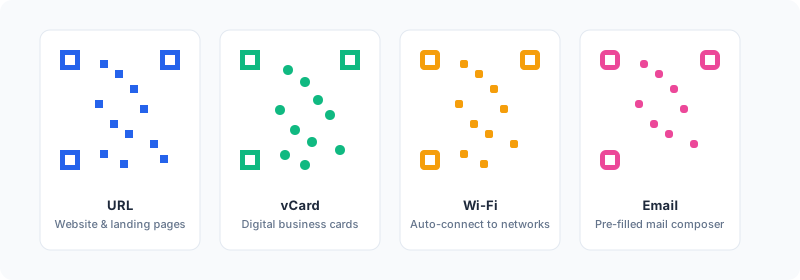
URL / Website
Encode a link to your homepage, landing page, store, or app download. The most common QR use, perfect for posters, packaging, and print ads.
vCard / Contact
Generate a contact card with name, phone, email, company, title, and website. One scan saves your details to any phone instantly.
Wi-Fi Network
Share your SSID and password as a QR code. Guests connect with a single scan — no typing, no spelling out passwords for café customers.
Pre-fill the recipient, subject, and body of an email. Great for support pages, feedback forms, and contact CTAs.
Phone & SMS
Tap-to-call or tap-to-text codes. Perfect for service businesses where the goal is to start a conversation immediately.
Plain Text
Encode any short message, slogan, instruction, or note. Useful for treasure hunts, event clues, and educational worksheets.
Nine Barcode Formats for Retail and Logistics
From global retail standards to industrial logistics — our free barcode generator covers them all.
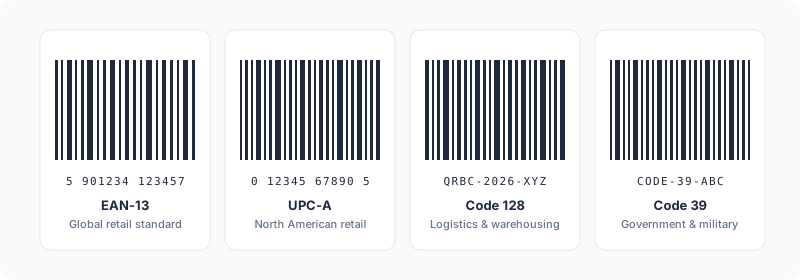
EAN-13 & EAN-8
The global retail barcode standard outside North America. EAN-13 is mandatory for products sold in supermarkets across Europe, Asia, and beyond.
UPC-A & UPC-E
The North American equivalent of EAN. Required by Walmart, Target, and most US retailers. UPC-E is a compact version for small packages.
Code 128
The workhorse of logistics. Encodes letters, numbers, and symbols compactly — perfect for warehouse labels, shipping, and internal SKUs.
Code 39
An older standard still used by government, military, and automotive industries. Less compact than Code 128 but very widely supported.
ITF-14
Printed on shipping cartons to identify case quantities. Standard for moving boxes between warehouses and retail back-rooms.
MSI, Pharmacode, Codabar
Niche formats for inventory shelving, pharmaceutical packaging, libraries, and blood banks. We support every format you might need.
Real Use Cases Across Six Industries
A QR code is just a pattern of squares. What you do with it is what makes it worth printing.
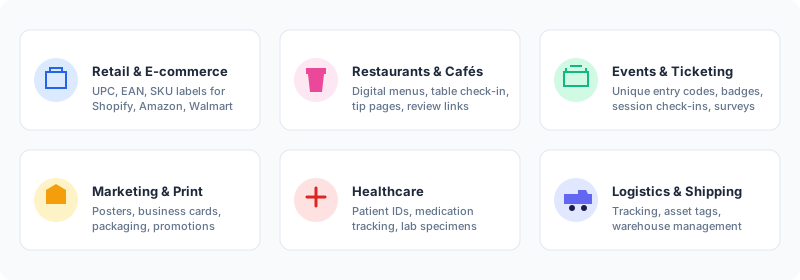
Retail & E-commerce
Generate UPC and EAN barcodes for Shopify, Amazon, Walmart, and brick-and-mortar shelves. Pair with QR codes on packaging for warranty registration and product reviews.
Restaurants & Cafés
Replace printed menus with table QR codes that link to your latest menu page. Add a Wi-Fi QR for guests, and a vCard QR for take-away orders.
Events & Ticketing
Use the bulk QR generator to create unique attendee codes, name badges, and session check-ins. Validate at the door in under a second.
Marketing & Print
Branded QR codes on flyers, business cards, posters, and packaging. Track campaigns with unique URLs per channel and watch which creative drives scans.
Healthcare
Patient ID wristbands, medication tracking, lab specimen labeling, and equipment tags. Code 128 and Data Matrix are the standards in this space.
Logistics & Shipping
Pallet labels, asset tagging, and warehouse rack identification. Combine ITF-14 for cases with Code 128 for individual SKUs and you cover the whole pipeline.
QR Code vs Barcode: Which Should You Use?
They look different and they solve different problems. Here is the short version.
| Feature | 1D Barcode | 2D QR Code |
|---|---|---|
| Designed for | Retail checkout, inventory | Marketing, customer interaction |
| Capacity | ~20 digits | Up to 4,000 characters |
| Read by | Industrial laser scanners | Any smartphone camera |
| Read direction | Horizontal only | Any angle, omnidirectional |
| Best content | SKU numbers, GTINs | URLs, vCards, Wi-Fi, payments |
| Damage tolerance | Low | Up to 30% with high error correction |
If you sell physical products, you almost certainly need both: a barcode on the back for checkout, and a QR code on the front or inside that drives a customer experience. Read the deep dive in our QR codes vs barcodes guide.
Tips for Printing QR Codes That Always Scan
A QR code that looks fine on your screen can fail completely on a printed flyer. Five rules that prevent every common failure.
1. Mind the Minimum Size
For close scans (table, business card) print at least 2 cm (0.8 in) wide. For posters, the rule is roughly 10% of the maximum viewing distance — a code seen from 2 m needs to be 20 cm wide.
2. Maintain a Quiet Zone
Leave at least 4 modules of empty space (about 10% of the QR width) on every side. Without it, scanners struggle to find the code's edges.
3. Use High Error Correction
If you embed a logo or print on a surface that may get scuffed, set error correction to H (30%). The code stays scannable even if a third of it is damaged.
4. Stick to High Contrast
Dark dots on a light background. Reversed colors (light dots, dark background) confuse many older scanners. If you need branded colors, keep the contrast above 4.5:1.
5. Always Download SVG for Print
SVG is vector — infinitely scalable, never blurry. PNG is fine for digital, but for any printed material above postcard size, use SVG.
6. Test Before You Print
Print one. Scan it on three phones (iPhone, Android, older device). Try in dim and bright light. Only then commit to the full print run.
Learn More From Our Guides
Field-tested tutorials for marketers, retailers, and event organizers.
How to Create a Custom QR Code for Your Business
The complete 2026 guide to designing branded QR codes that actually get scanned.
Adding Logos to QR Codes
Why a branded code beats plain black-and-white — and how to add a logo without breaking the code.
The Ultimate Guide to Retail Barcodes
UPC, EAN, Code 128, ITF-14 — which format to use and when, with print-ready specifications.
Why You Need a Bulk QR Generator
Generate hundreds of unique QR codes from a CSV — the productivity unlock for events, ticketing, and inventory.
Make a Scannable vCard QR Code
One scan saves your contact details forever — better than any business card.
Barcodes for Shopify and Amazon
Generate compliant retail barcodes for every major e-commerce marketplace.